Lodehost
Two distances, two different jobs
| Setting | What it controls | Default | Range |
|---|---|---|---|
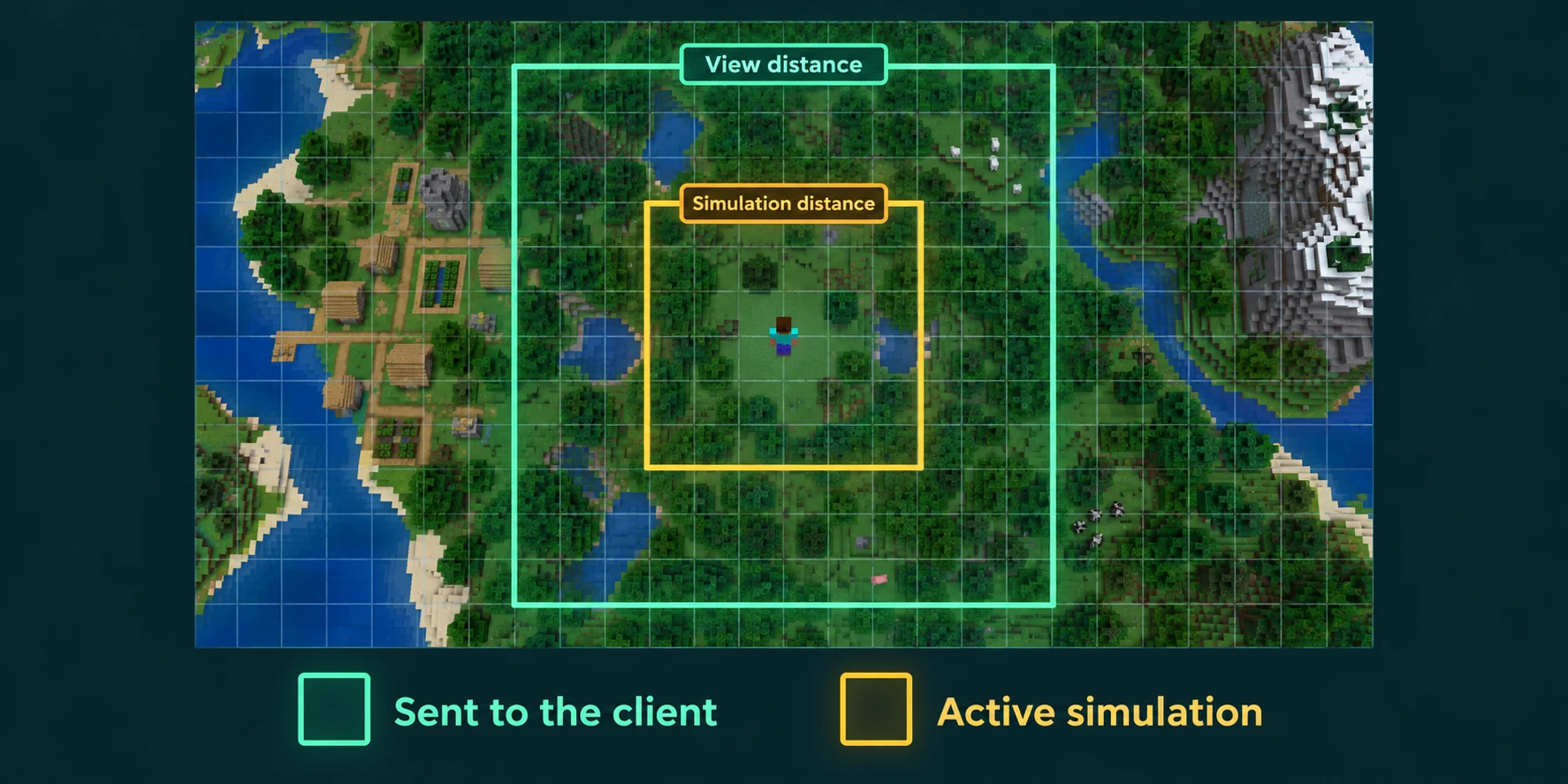
view-distance | How many chunks of terrain the server sends to each player | 10 | 3 to 32 |
simulation-distance | How far from a player mobs move and spawn, crops grow, fires spread and redstone runs | 10 | 3 to 32 |
entity-broadcast-range-percentage | How far away players still receive mobs, items and other entities, as a percentage of the normal range | 100 | 10 to 1000 |
Both distances count in chunks from the chunk a player stands in. A view distance of 10 means 10 chunks in every direction, so an area 21 chunks wide, or 336 blocks. Beyond the simulation distance the terrain can still be visible, but nothing in it happens: a cow stands still in mid step and wheat does not grow.
Players have a render distance setting of their own. They see the lower of the two: someone who sets 24 chunks on a server with a view distance of 10 still sees 10.
What players notice when you change them
- Lower view distance: the fog starts closer and far-off mountains pop in later while flying. Building and farming feel the same.
- Lower simulation distance: mobs in the distance freeze until you walk closer, farms stop sooner when you leave, and crops on the far side of a big base grow only while someone is near.
- Lower entity broadcast range: mobs and dropped items appear later as you approach. It saves bandwidth and client effort, and at 70 percent most players never notice.
Why a few steps cost so much
The work grows with the area, and the area grows with the square of the distance. A view distance of 16 covers an area 33 chunks wide instead of 21, which is about two and a half times as much terrain for every player who stands somewhere else. The same happens with simulation distance, where the price is paid on every tick instead of once while loading.
| Distance | Width in chunks | Width in blocks | Area compared to 10 |
|---|---|---|---|
| 6 | 13 | 208 | about 0.4 times |
| 8 | 17 | 272 | about 0.65 times |
| 10 | 21 | 336 | 1 |
| 12 | 25 | 400 | about 1.4 times |
| 16 | 33 | 528 | about 2.5 times |
| 32 | 65 | 1,040 | about 9.6 times |
That is why simulation distance is the one to be careful with. Ticking a chunk means running its mobs, redstone and block updates twenty times per second. Sending a chunk mostly costs loading it and the network traffic, and then it sits there quietly.
The three profiles in our panel
The Settings tab has a Performance profile card that fills in a handful of these values at once. Nothing is saved until you check the form and press save, so it is safe to click around.
| Profile | View distance | Simulation distance | Entity broadcast range | Sync chunk writes |
|---|---|---|---|---|
| Safe | 6 | 4 | 70% | on |
| Balanced | 10 | 8 | 100% | off |
| Performance | 14 | 10 | 120% | off |
Sync chunk writes on means every chunk save waits until it is on disk. That is slower, but it loses less if the server is cut off in the middle of saving.
Next to the profiles the panel names a sensible ceiling for the view distance of your plan: 8 chunks below 4 GB of memory, 10 chunks from 4 GB and 14 chunks from 8 GB. It is a ceiling, not a target. A busy server with players spread over a large map does better below it.
Farms, AFK spots and simulation distance
A farm only works while its chunks are simulated, and that means a player has to be within the simulation distance. With a simulation distance of 4, a farm more than 4 chunks, or roughly 64 blocks, from the AFK spot stands still. Mob farms add their own rule on top: monsters spawn at least 24 blocks away from a player and disappear beyond 128 blocks.
- Measure the distance from the AFK spot to the far edge of the farm, divide by 16 and round up. The simulation distance has to be at least that number.
- Put the AFK spot in the middle of what should keep running, not at one end.
- Since 1.21.2 a vanilla server stops ticking 60 seconds after the last player leaves, set by
pause-when-empty-seconds. Farms do not run on an empty server unless you change that.
Find the right values for your server
Start from Balanced
View distance 10 and simulation distance 8 suit most survival servers. Save and restart so the values take effect.
Measure a normal evening
With players online, run
spark tpsin the console. Ticks well under 50 milliseconds leave room to spare; ticks close to 50 mean you are at the limit.Change one value by one or two steps
Raise the view distance when there is room, lower the simulation distance when there is not. Change one thing per evening, or you will not know which change did what.
Keep simulation at or below view distance
Players cannot see the world beyond their view distance anyway, so a simulation distance above it mostly costs ticks without anyone noticing.
On Paper and Spigot, spigot.yml can set both distances per world, where the word default means the value from server.properties. A small view distance in the Nether and a larger one in the overworld is a common split. The spark guide shows how to read tick times properly, and generating terrain ahead of time takes the loading cost out of exploring.
Written and checked by the Lodehost team, last reviewed on 13 September 2026.