Lodehost
Which message players get, and why it differs
A Java server and a Java game only talk when they speak the same protocol, and nearly every release changes it. When they differ, the server closes the connection before the player loads in. The wording they read depends on the server software, which is why two people with the same problem can quote different lines.
Paper and Purpur servers, 26.2 included
Outdated client! Please use 26.2
Outdated server! I'm still on 26.2
Paper and Purpur send a text of their own. Outdated client means the player's game is older than the server. Outdated server means the player's game is newer, the usual case right after someone updates the launcher. In both lines the version at the end belongs to the server, never to the player.
Vanilla servers, as worded by games from 1.16.4 on
Incompatible client! Please use 26.2A vanilla server leaves the wording to the player's own game. Games from 1.16.4 onwards show that one sentence whether they are ahead or behind, so it does not tell you which way round the mismatch is; games up to 1.16.3 still spoke of an outdated client or server. Ask the player which version their launcher shows, or use the command further down this page once they are in.
In the multiplayer list, before joining
Incompatible version!
Client out of date!
Server out of date!
The server list warns before anyone clicks Join. Current releases show the first line; 1.13 up to 1.15.2 used the other two. Other ways a connection fails, from a wrong address to a whitelist, are in the connection guide.
Changing the text on Paper
spigot.yml
messages:
  outdated-client: "Outdated client! Please use {0}"
  outdated-server: "Outdated server! I'm still on {0}"
Both lines live under messages in spigot.yml, and {0} is replaced by the server's version. If you decide not to bridge versions, rewrite them into something that helps, such as telling players exactly which release to pick in the launcher, and restart the server.
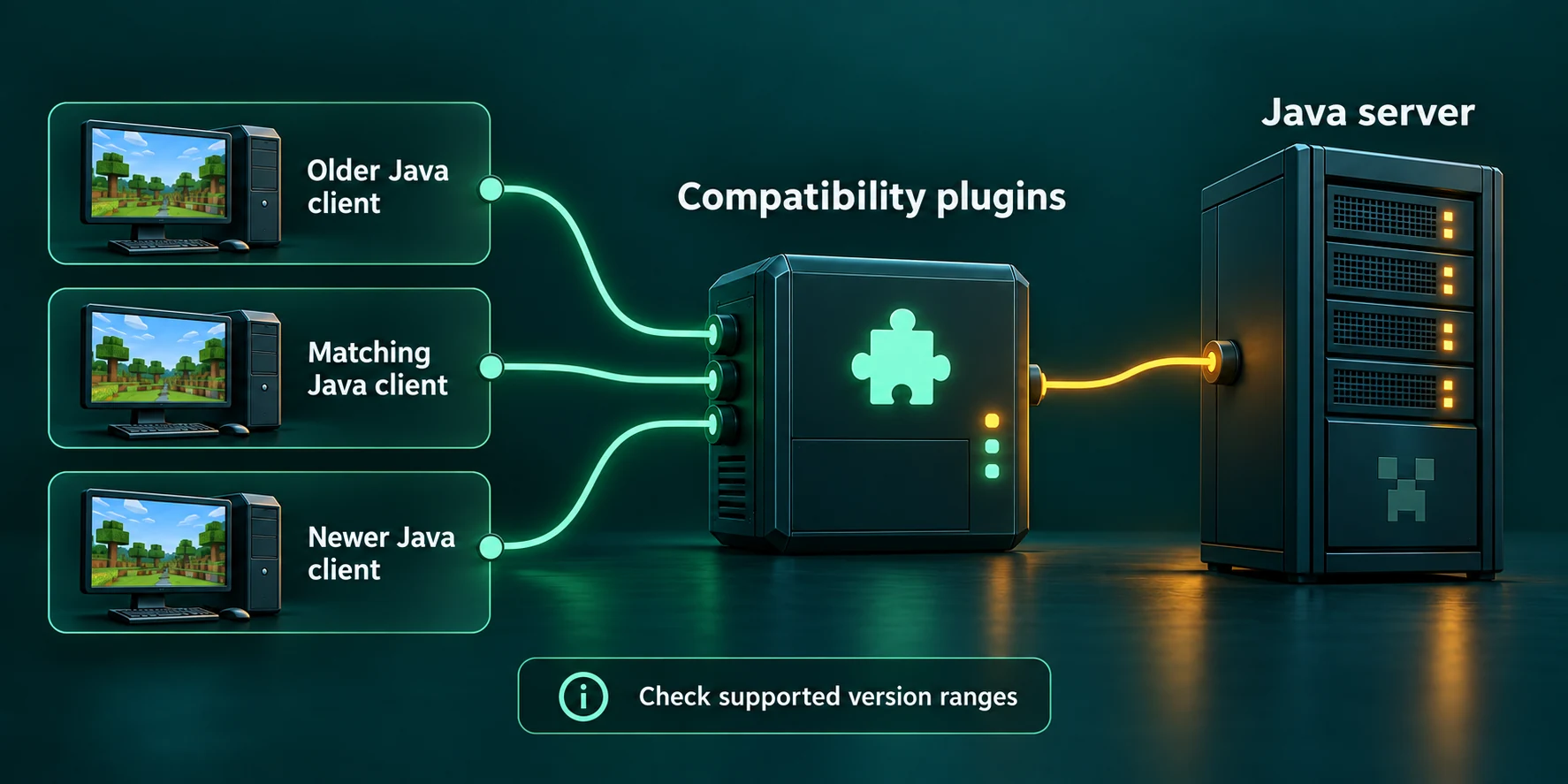
ViaVersion, ViaBackwards or ViaRewind
The three names describe a direction. ViaVersion lets games that are newer than the server in. ViaBackwards is an add-on that lets older games in, and ViaRewind goes further back to the two oldest families still in use. Each add-on needs the ones before it.
| The player's game | Example | Install on the server |
|---|---|---|
| Newer than the server | 26.2 player, 1.21.11 server | ViaVersion |
| Older than the server, 1.9 or later | 1.20.4 player, 26.2 server | ViaVersion and ViaBackwards |
| 1.7.x or 1.8.x | 1.8.9 player, 26.2 server | ViaVersion, ViaBackwards and ViaRewind |
| A mix of all of the above | A public server | All three |
ViaBackwards runs on servers from 1.10 up, and ViaRewind needs a server on 1.9 or newer.
Which way round should the server go? A server on the newest release, with ViaBackwards for the stragglers, gives most players the whole game and asks the older ones to accept a few gaps. A server kept on an old release for its combat or its plugins, with ViaVersion in front, lets up-to-date players in while the world itself stays old. Both are sound; decide by what the world depends on.
The day a new Minecraft version comes out
The team publishes support for a new release a day or so after it appears, unless the protocol barely changed. Until then, players who update early get the version message even with ViaVersion installed. Telling your group to wait a day saves a lot of questions.
Where the three plugins can run
| Server software | Via support | Worth knowing |
|---|---|---|
| Paper and Purpur | All three, as plugins | Where the project works best. On our panel they come from the Plugins tab. |
| Velocity proxy | All three, as plugins | Install on the proxy or on the servers behind it, never on both. |
| Fabric | ViaFabric, a mod that includes ViaVersion | Needs Fabric API. Its builds for 26.x are marked alpha at the time of writing. |
| Forge and NeoForge | No server version | ViaForge is a mod for the player's game only, and its makers archived it in April 2026. |
| Vanilla | None | A vanilla server cannot load plugins. Switching the same world to Paper is the way in. |
Behind a proxy the choice has consequences. With ViaVersion on the proxy, translation happens before a player reaches any server, and the project warns that anti-cheat plugins cope worse with that. On the servers themselves each one translates for its own players. In a network built on our panel the servers behind the proxy are Paper or Purpur, so installing on each of those from its Plugins tab is the straightforward route.
All three need Java 17 or newer. That is no issue on a current server, but a 1.8.8 or 1.12.2 server runs on Java 8 and will refuse the plugin. The Java version guide explains the error you get and what to do about it.
Installing them on our panel
Open the Plugins tab
The tab appears on Paper and Purpur servers. Next to the Plugin catalog heading the panel names the server type and version the list was matched to.
Filter on Compatibility
Click the Compatibility button above the cards, or type Via into Search plugins. ViaVersion, ViaBackwards and ViaRewind sit together there.
Install what the table asks for
Press Install on each one you need, starting with ViaVersion. When a card has more than one stable build for your version, a Version list lets you pick; the newest is selected at the top.
Restart the server
Plugins load at startup, so the panel reminds you to restart. After that the three files show up under Installed on this server.
The catalog only lists stable releases that name your exact server type and version. That quietly keeps all three on the same release channel, which their makers ask for. They do recommend their beta builds; if you ever upload betas yourself through Upload on the Files tab, replace all three together. On a very old server a card can be missing altogether: current ViaVersion builds do not list 1.8.8, for instance.
Console
viaversion listOnce players are online, viaversion list in the Console tab groups them by the version their game runs. In the game the same command needs operator rights. The catalog also has ViaVersionStatus, which prints a player's game version when they join, handy on a public server where you want to spot very old clients.
What players on older versions see differently
Most differences show up for players who are behind, because their game has never heard of the blocks, mobs and screens added since. ViaBackwards fills those gaps with stand-ins, and a few things it cannot fill at all.
- Deep caves and tall builds. Games older than 1.17 cannot see or touch blocks below y=0 or above y=255. On a modern world that hides the deepest caves and most of the deepslate.
- Look-alike blocks and mobs. A sculk shrieker shows up as crying obsidian for a 1.18.2 player, and the darkness effect turns into blindness. A mob the old game lacks is drawn as one it has, with its real name above it.
- Items that did not exist yet. They appear as a stand-in item. ViaBackwards passes the real name along so a resource pack can put the right look back.
- The smithing table. Games older than 1.19.4 cannot use it on a 1.20 or newer server. AxSmithing, also in the catalog under Gameplay, fixes that.
- Newer screens. Server dialogs from 1.21.6 open as chest inventories for 1.21.5 players, and display entities become armor stands for 1.19.3 players.
- Small glitches. Pre-1.17 games can see inventory clicks go out of sync, and some sounds are missing because the sound mapping is incomplete.
1.8 and 1.7 players
ViaRewind bridges the biggest gap, the 1.9 combat update. A 1.8 player on a newer server still has an attack cooldown but no indicator for it, so ViaRewind shows it as a title by default. In plugins/ViaRewind/config.yml, cooldown-indicator also accepts ACTION_BAR, BOSS_BAR or DISABLED, and a change needs a restart. The offhand did not exist in 1.8 either, so those players type /offhand to move items between their main hand and offhand.
Test with the oldest game you allow
Before you announce support for an old version, join with that version yourself and walk through spawn, a shop and the deepest part of the map. What looks fine in 26.2 can be a hole in the floor for a 1.16 player.
Draw a line under the oldest version
Every extra old version brings more of the gaps above, and more movement for anti-cheat to misread. ViaVersion can turn away versions you do not want. Open plugins/ViaVersion/config.yml on the Files tab and fill in block-versions:
plugins/ViaVersion/config.yml
block-versions: ["<1.20"]
block-disconnect-msg: "You are using an unsupported Minecraft version!"
A < in front blocks everything below that version, a > everything above it, and a plain version blocks just that one. The second line is the text blocked players receive, shown here with its default. Restart after the change. A blocked version sees the server as incompatible in its multiplayer list, while a version ViaVersion does translate sees a normal server, because the plugin answers the list's ping with the player's own version.
Why modded servers cannot bridge versions
A mod is built against a particular Minecraft release, and on a Fabric, Forge or NeoForge server every player needs the same mods in the same versions as the server. A player on another release usually cannot run those mods at all, so there is nothing to translate towards. The modded server guide covers getting everyone onto matching versions.
The Via team says so in plain terms: ViaVersion is designed for vanilla servers and probably will not work with modded registry entries, which is exactly what new blocks, items and entities from mods are. ViaFabric does exist for Fabric servers, and that warning applies to it as well. Forge and NeoForge have no server version at all.
On our panel the Plugins tab is only there for Paper and Purpur, so a Fabric, Forge, NeoForge or vanilla server will not show it. If mixed versions matter more than mods, the loader comparison and Paper or Purpur help you choose. The Minecraft version field on the Settings tab carries the same warning in short: installed plugins and mods must support the version you pick.
Bedrock players need Geyser, not Via
Every Via project translates between one Java release and another. Bedrock Edition on phones, tablets, consoles and Windows speaks a different protocol altogether, so none of the three lets a Bedrock player in, however old or new their game is.
That job belongs to Geyser, which joins your server as if it were a Java player on the newest release, 26.2 right now. The two can work together: when the server runs an older version than Geyser speaks, Geyser's own documentation puts ViaVersion in between. How Bedrock players connect, and what Crossplay plans set up, is in the Java and Bedrock guide.
Written and checked by the Lodehost team, last reviewed on 14 September 2026.