Lodehost
How the file works
- One setting per line, written as
key=value. Lines that start with#are comments. - Read at start. The server reads the file when it starts, so any change waits for the next restart.
- Written back. At start the server also saves the file again and adds every missing line with its default value. A misspelled key breaks nothing; the server just does not use it.
- UTF-8. The file is read as UTF-8, with an older encoding as the fallback, which matters for accented letters and color codes in the server description.
On our panel most lines have a field on the Settings tab, grouped as shown below. Every line, including the ones without a field, can be edited in the file itself on the Files tab.
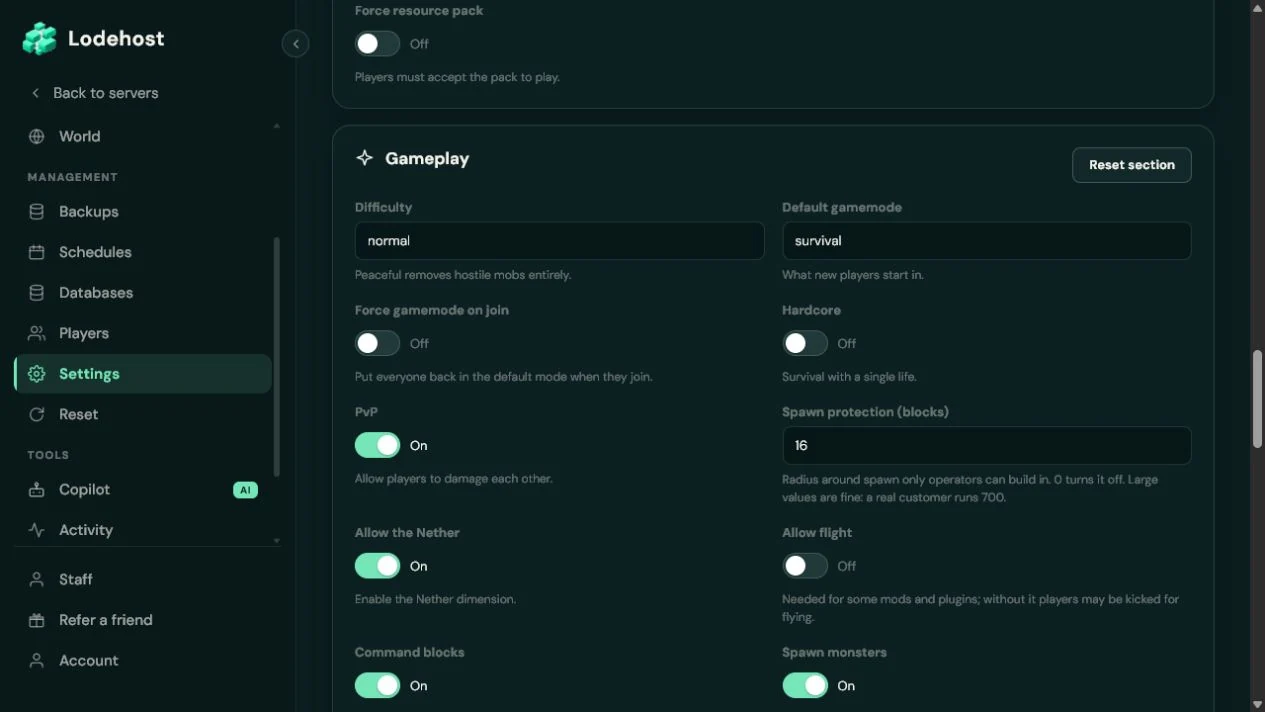
The six groups on the Settings tab
| Group | What is in it |
|---|---|
| General | Server description, max players, idle kick and the four resource pack fields |
| Gameplay | Difficulty, default gamemode, hardcore, spawn protection and flight |
| World | World type, and whether structures generate |
| Performance | View distance, simulation distance, entity range, the watchdog and chunk writes |
| Access | Whitelist, account checks, signed chat, proxy connections and the player list |
| Advanced | Server list pings, output for operators, IP logging, compression and the rate limit |
A handful of lines have no field on purpose: server-port, server-ip, query.port, enable-rcon, rcon.password, level-name and level-seed. The port and address belong to the connection we set up for your server, and a new seed goes through the Reset world card on the World tab.
Who can join
| Line | Default | What it does |
|---|---|---|
online-mode | true | Checks every account with Mojang. Off lets anyone join under any name, so leave it on unless a proxy does the check. |
white-list | false | Only players on the whitelist may join. |
enforce-whitelist | false | Kicks players who are online but not on the whitelist as soon as the list is switched on or reloaded. |
max-players | 20 | How many players can be online at the same time. |
enforce-secure-profile | true | Only lets in players with a chat signing key from Mojang. |
prevent-proxy-connections | false | Kicks a player who connects from another address than the one that signed in with Mojang, which stops some VPN and proxy setups. |
player-idle-timeout | 0 | Minutes before an idle player is kicked. 0 never kicks anyone. |
hide-online-players | false | Keeps the names of online players out of the server list. |
log-ips | true | Writes player IP addresses to the server log. |
enable-code-of-conduct | false | Asks players to accept a code of conduct before they join. The text comes from files in a codeofconduct folder next to server.properties, one per language, such as en_us.txt. |
The commands for the whitelist and operators are in the whitelist guide, and online-mode behind a proxy is explained in the network guide.
How the game plays
| Line | Default | What it does |
|---|---|---|
difficulty | easy | peaceful, easy, normal or hard. Peaceful removes hostile mobs. |
gamemode | survival | The game mode new players start in. |
force-gamemode | false | Puts every player back in that game mode each time they join. |
hardcore | false | Locks the difficulty to hard and turns players who die into spectators. |
spawn-protection | 16 | Blocks around world spawn where only operators can build. The protected square is twice the value plus one wide, and it protects nothing while the server has no operators. |
allow-flight | false | When off, players who hang in the air for a while without a reason are kicked. Plugins and mods that let players fly need it on. |
max-world-size | 29999984 | The largest radius, in blocks, that the world border can reach. |
Lines that became game rules
Since 1.21.9, pvp, allow-nether, enable-command-block and spawn-monsters are game rules, and those four lines do nothing on such servers. The rules are now called pvp, allow_entering_nether_using_portals, command_blocks_work and spawn_monsters. spawn-animals and spawn-npcs were removed in 1.21.2. Servers on older versions still read all of these lines.
The game rules guide shows how to set those rules, from keep inventory to the sleep percentage.
The world, and the moment it is created
level-name, world by default, names the folder the server loads at every start. Point it at a folder that does not exist yet and the server creates a new world there. The other lines in this table only count at that moment of creation; on a world that already exists they change nothing.
| Line | Default | What it does |
|---|---|---|
level-seed | empty | The seed. Empty picks a random one. |
level-type | minecraft:normal | Default, flat, large biomes, amplified or single biome. |
generate-structures | true | Villages, strongholds and every other structure. |
generator-settings | {} | Layers and biome for a superflat world. |
initial-enabled-packs | vanilla | Built-in packs to switch on in the new world, such as experimental features. |
initial-disabled-packs | empty | Packs to leave switched off in the new world. |
Starting over with another seed or world type is covered in the seed and world type guide, and the packs in the datapacks guide.
Performance
| Line | Default | What it does |
|---|---|---|
view-distance | 10 | How many chunks around each player are sent to their game. |
simulation-distance | 10 | How many chunks around each player keep running: mobs, crops, redstone. |
entity-broadcast-range-percentage | 100 | How far away mobs and other entities are shown, as a percentage of the normal distance. |
max-tick-time | 60000 | How long a single tick may take, in milliseconds, before the watchdog shuts the server down. -1 turns that check off. |
sync-chunk-writes | true | Waits until chunk data is on disk before moving on. Safer when the machine stops suddenly, slower on a busy server. |
network-compression-threshold | 256 | Packets larger than this many bytes are compressed. -1 turns compression off. |
pause-when-empty-seconds | 60 | Seconds without anyone online before the server pauses. |
The first two lines outweigh everything else in this table, and they have a guide of their own.
Advanced lines and remote access
| Line | Default | What it does |
|---|---|---|
enable-status | true | Answers server list pings. Off makes the server look unreachable in the list, although players can still join. |
op-permission-level | 4 | The operator level that new operators receive. |
function-permission-level | 2 | The permission level that functions from datapacks run with. |
broadcast-console-to-ops | true | Shows the output of console commands to operators in chat. |
broadcast-rcon-to-ops | true | Shows the output of remote console commands to operators. |
rate-limit | 0 | How many packets a player may send per second before being kicked. 0 means no limit. |
enable-query | false | Answers the query protocol that some server list websites use. |
enable-rcon | false | Opens a remote console, protected by rcon.password. |
accepts-transfers | false | Lets other servers send players here with the transfer command. |
use-native-transport | true | Uses faster networking on Linux. Leave it on. |
region-file-compression | deflate | How chunks are compressed on disk: deflate, lz4 or none. Changing it leaves chunks that are already saved as they are. |
bug-report-link | empty | A web address players get as the link for reporting bugs on your server. Empty sends no link. |
The remaining lines, such as enable-jmx-monitoring, text-filtering-config and max-chained-neighbor-updates, serve monitoring tools and special setups. The group that starts with management-server switches on a remote management protocol for tools, and it is off by default. Their defaults suit nearly every server.
Leave the connection lines alone
server-port and server-ip have to match the address we set up for your server. Changing them by hand in the file can make the server unreachable, which is why the Settings tab has no field for them.
Text with colors and a second line
Text values such as motd accept the § color codes, and \n starts a second line. The field on the Settings tab keeps text on one line, so a description with two lines is written in the file on the Files tab. The MOTD and icon guide lists all the codes.
Written and checked by the Lodehost team, last reviewed on 14 September 2026.