Lodehost
How a server resource pack reaches players
- A player joins, and the server sends the link to the pack together with its checksum.
- The game asks whether to download it and shows your prompt, unless the player chose earlier to always accept packs from this server.
- The game downloads the pack straight from the link, compares it with the checksum and applies it.
- On a later visit, a pack with the same checksum comes from the player's own cache instead of being downloaded again.
Because the download runs between the player and the place where the file is stored, the server takes no part in it. What counts is a link that starts the download at once and a checksum that matches the file.
A link that works
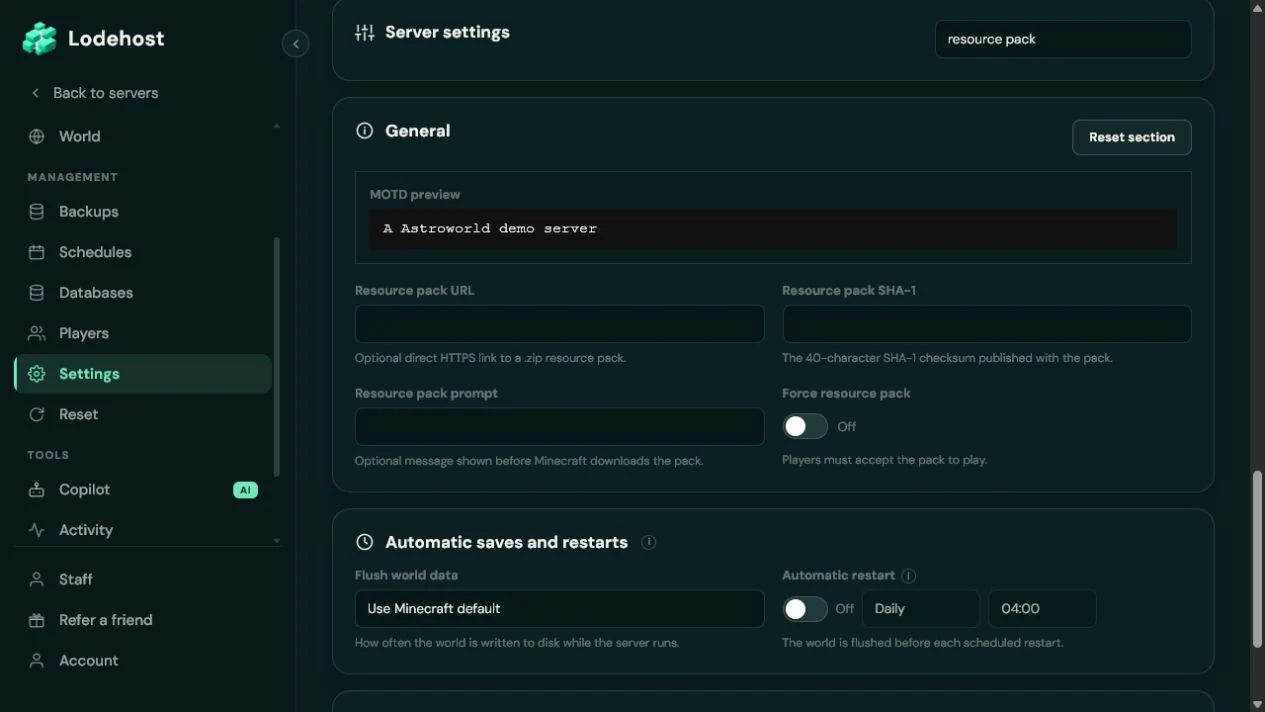
- HTTPS. The Resource pack URL field on the Settings tab only accepts links that start with https://.
- Direct. The link has to lead to the zip itself, not to a page with a download button. Paste it into a private browser window: the download should start right away.
- Lasting. Every new player downloads from that address, so keep the file somewhere it stays online.
- A zip with `pack.mcmeta` at the top. Open the zip on your computer:
pack.mcmetaand theassetsfolder belong in its first level, not inside another folder.
Share pages are not downloads
Many cloud storage services hand out a link to a preview page by default, and the game cannot read that page. Look for the option that gives a direct download link, or put the file on an ordinary web host.
The SHA-1 checksum
The checksum is a fingerprint of the file, 40 characters long. The game uses it to confirm that the download arrived complete and unchanged, and to recognize a pack it already has. Write it in lowercase letters and digits, and create it again every time the zip changes.
Creating the checksum
# Windows, in Command Prompt
certutil -hashfile pack.zip SHA1
# macOS, in Terminal
shasum -a 1 pack.zip
# Linux
sha1sum pack.zip
PowerShell's Get-FileHash gives the same value in capital letters, so turn it into lowercase before pasting. The Resource pack SHA-1 field expects exactly 40 characters and no spaces.
Asking nicely, or requiring the pack
| Force resource pack | What players see | When they decline |
|---|---|---|
| Off | This server recommends the use of a custom resource pack, with your prompt below it | They play on without the pack |
| On | A question that says the pack is required, with your prompt below it | They are disconnected with the message This server requires a custom resource pack |
Resource pack prompt takes up to 150 characters and appears in the question players get. Use it to say what the pack does for them, for example: Adds the textures for our custom items and the lobby signs. A prompt like that answers the question players ask themselves at exactly that moment.
Require the pack only when the server truly depends on it, such as custom items that look like plain paper without it. A player who once set Server Resource Packs to Disabled for your server in their list is then disconnected on every attempt, until they change that setting back.
Updating the pack
Upload the new zip
Replace the file at the same address, or upload it under a new name and use that link instead.
Create a new checksum
Run the checksum command on the new zip and paste the result into Resource pack SHA-1.
Restart the server
The resource pack fields count from the next restart, like every line of
server.properties.Let players rejoin
Players get the new version when they next join. Anyone already online keeps the old one until then.
Skipping the second step is the usual mistake. With the old checksum in place, a returning player's game keeps using the copy it already has, and a new player's game rejects the new download because it does not match.
When the pack fails to download
The game reports how many packs failed, for example 1 out of 1 pack(s) failed to download. These causes cover almost every case:
| Cause | Fix |
|---|---|
| The link opens a web page | Use a direct download link |
| The checksum belongs to an older file | Create the checksum again from the file that is online now |
| The checksum is in capitals or contains spaces | Paste 40 lowercase characters without spaces |
| The file was removed or the link expired | Upload the zip again and update the link |
A pack that downloads fine but changes nothing usually has an extra folder at the top of the zip. Zip the contents of that folder instead, so pack.mcmeta sits in the first level.
Bedrock players and other versions
A Java resource pack reaches Java players only. Bedrock players on a Crossplay server use a different pack format and do not receive it.
A pack is made for a range of Minecraft versions, noted in its pack.mcmeta. Keep it in step with the version your server runs, above all after an update that changed how models or textures are stored. Packs that change what the game does, rather than how it looks, are datapacks, and those run on the server itself.
Written and checked by the Lodehost team, last reviewed on 14 September 2026.