Lodehost
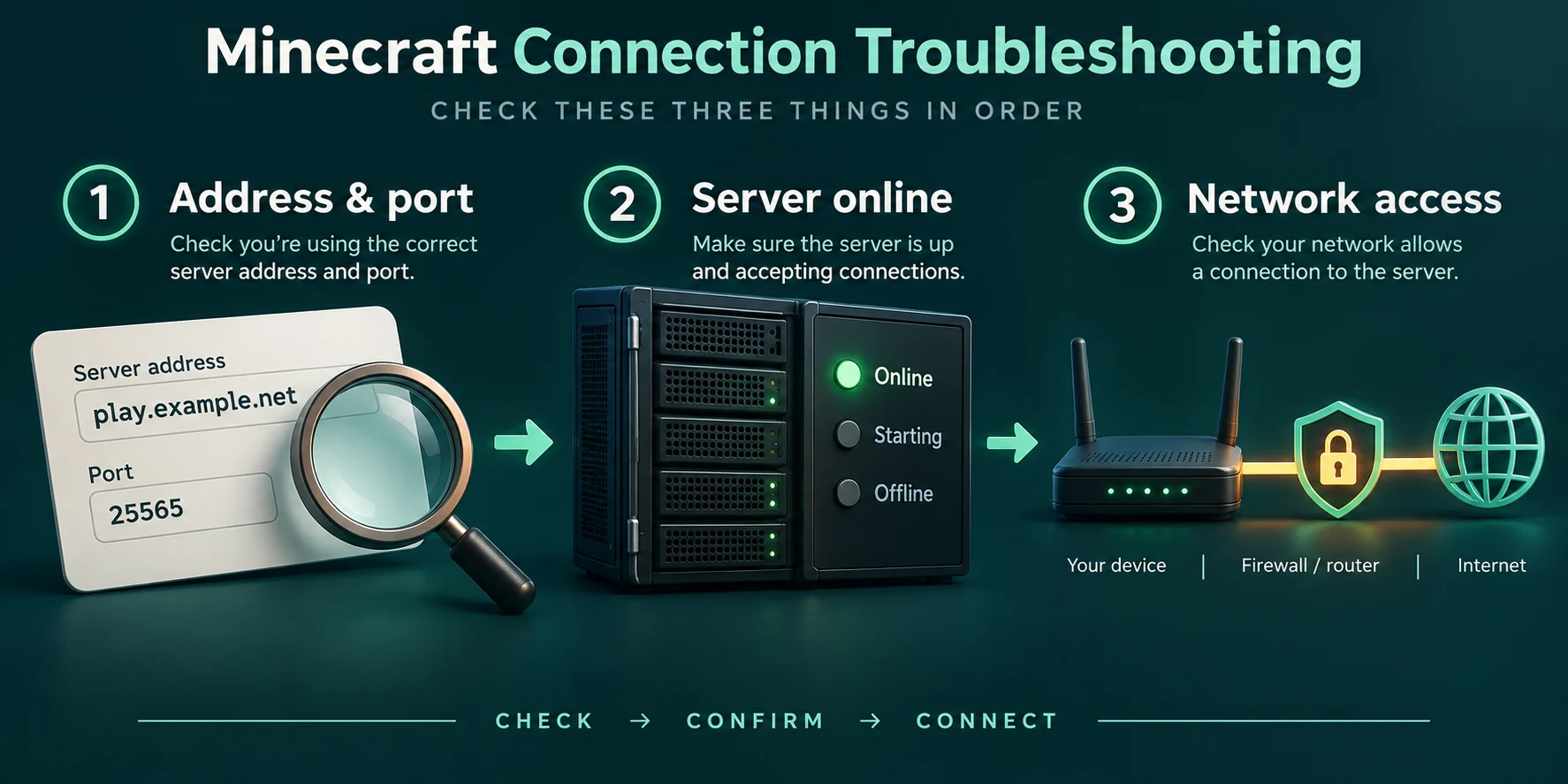
Check these three things first
- Is the server running? Open the panel. A stopped server, or one that is still starting, answers nothing, and every player sees a timeout or a refused connection.
- Is the address exactly right? One wrong letter gives
Unknown host. Copy the address from the panel instead of typing it from memory. Java players add no port behind it. Where a server's address comes from is in how to find a Minecraft server IP. - Can anyone else get in? If one friend joins and another cannot, the server is fine and the problem sits with that one player: the version, the account or the network.
Keep the console open while the player tries again. Someone who reaches the server leaves a line there, even when the server sends them away. No line at all means the attempt never arrived.
Java Edition messages and what they mean
These are the texts the Java game shows under its connection error, in the wording of the current release. Some messages include extra details, such as a ban reason or a version number.
| What the player sees | What it means | What to do |
|---|---|---|
Unknown host | The address does not exist. Usually a typo, a missing part of the name or a space at the end. | Copy the address from the panel and paste it again. |
A message with Connection refused | The address is right but nothing answers on it: the server is off or still starting. | Start the server and wait for Done in the console before joining. |
Timed out | Traffic went out and nothing came back in time. The server is frozen or overloaded, or a network in between blocks the game. | Check the console. If the server is stuck, restart it; if it looks fine, try the player on another network. |
Incompatible client! Please use 26.2 | Player and server run different versions. Recent releases show this text whether the player is ahead or behind. | Pick the version from the message in the launcher, or change the server's version in the panel. |
You are not white-listed on this server! | The whitelist is on and this player is not on it. | Add them with whitelist add <name> in the console, or from the Players tab. |
You are banned from this server | The name is on the ban list, sometimes with a reason and an end date. | pardon <name> lifts it; an IP ban needs pardon-ip. The Players tab has an unban button too. |
The server is full! | max-players has been reached. | Raise max-players in the settings, or let chosen operators past the limit in ops.json. |
Failed to verify username! | The server could not confirm the account, which happens with unofficial launchers and right after a name change. | Restart the game and the launcher. On an online-mode server only real Java accounts get in. |
Invalid session (Try restarting your game and the launcher) | The player's login has expired. | Close Minecraft and the launcher completely, then start both again. |
Multiplayer is disabled. Please check your Microsoft account settings. | Multiplayer is switched off on the account, often a child account under family settings. | The account owner allows multiplayer in the Microsoft family or Xbox privacy settings. |
You logged in from another location | The same account joined from a second computer. | Close the other session. If nobody else should have the account, change its password. |
Expired profile public key | The computer's clock is off, so the signature on chat messages looks out of date. | Set the system clock to sync automatically and restart the game. |
This server requires a custom resource pack | The player declined a pack the server insists on. | Accept the pack on the next try, or switch off require-resource-pack. |
Flying is not enabled on this server | The server saw movement it reads as flying, often from a client mod or a lag spike. | Remove movement mods from the client, or set allow-flight=true if your plugins or mods need it. |
Kicked for spamming | Too many chat messages or commands in a short time, often a macro or a chat mod. | Since 26.2 the limits are settings of their own: chat-spam-threshold-seconds and command-spam-threshold-seconds. |
Bedrock players on a Crossplay server
Bedrock says less. Its usual message is Unable to connect to world, and on a Crossplay server that almost always comes down to one of three things:
- The port. Bedrock players need the Bedrock port from the panel, in the separate port field. The default 19132 does not reach your server. Minecraft server ports explains which port does what.
- The Bedrock side did not start. Geyser logs a start line with its port while the server boots. If that line is missing or names another port, the Geyser config was changed.
- The version.
Outdated clientorOutdated servermeans the translation layer does not match that Bedrock version. Updating the game fixes the first; on Crossplay plans we keep Geyser current for the second.
How Bedrock players add a server, including consoles, is in the Java and Bedrock guide.
When it only fails for one player
- School, office and some public networks block game traffic. A phone hotspot is the quickest way to find out.
- A VPN or a strict firewall on the player's computer can stop Java from connecting. Pause it for one attempt.
- After you change an address, a player's network can hold on to the old one for a while. Restarting the router usually clears it.
- Consoles cannot add servers without a detour. That is not an error on your side.
When nobody can get in
Open the console
Read the last lines. A server that crashed shows an error there; one that is still loading shows how far it is with the spawn area.
Wait for Done
Players can join once the console prints
Donewith the startup time behind it. Joining before that gets refused.Check the whitelist switch
A whitelist that was just turned on sends away everyone who is not on it. Operators are the exception: they get in without being listed.
Restart once, then look deeper
A restart clears a frozen server. If it freezes again at the same moment, the startup guide and a spark report help you find the cause.
Written and checked by the Lodehost team, last reviewed on 13 September 2026.