Lodehost
What a proxy actually does
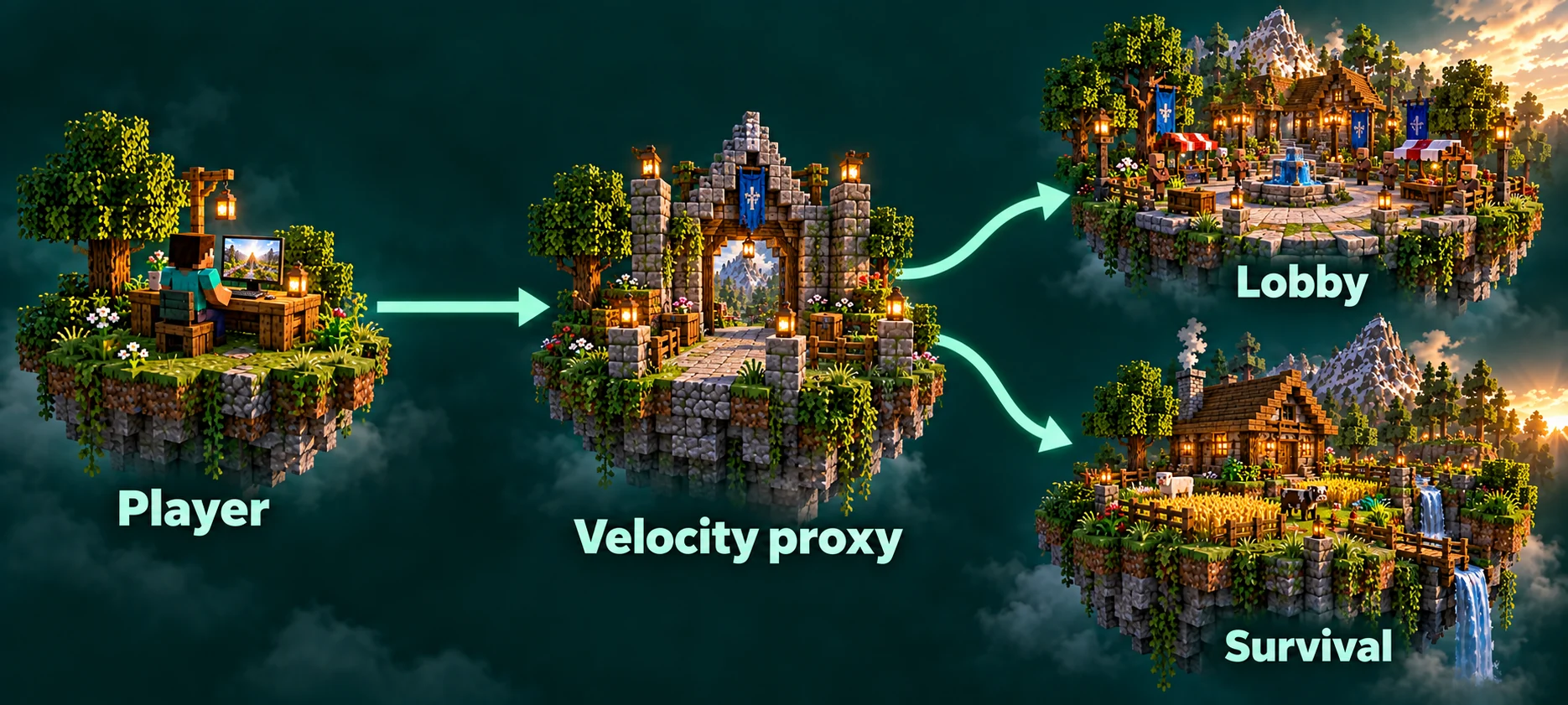
Velocity is a proxy: a small program that sits between the players and your servers. It has no world, no mobs and no blocks of its own. A player connects to Velocity, Velocity checks their account and hands them to one of the servers behind it, and when the player types /server survival it moves the connection to another server without sending them back to the title screen.
Because every player comes in through the same door, the proxy also decides where a new arrival lands. That first stop is usually a lobby: a small world with a spawn, a few signs and nothing worth breaking.
| What | Where it lives |
|---|---|
| Worlds, builds and chests | On each server |
| Inventory, ender chest, health and experience | On each server, so survival items never show up in the lobby |
| Plugins and their settings | On each server |
| Whitelist, bans and operators | On each server |
| Checking accounts when players log in | On the proxy |
| Where a player lands first | On the proxy |
Moving between servers with /server | On the proxy |
When a network is worth it
- Two game modes that should not mix. A hardcore survival world and a relaxed creative world, each with its own rules and its own plugins.
- A lobby in front of the main world. New players read the rules and choose where to go before they can dig a single block.
- A minigame next to survival. The minigame plugins stay off the survival server, so a bug in one cannot damage the other.
- A test copy. A second server with the same plugins, where an update gets tried before the real world receives it.
For a group of friends in one world, a network only adds moving parts. One server is simpler to run, and the RAM guide is a better first stop.
Which modes belong behind the lobby depends mostly on how many players are online at your busiest hour. Minecraft server game modes on astroworldmc.site has 30 ideas, a table of which modes work at each number of players online, and what to share or keep apart between the servers.
Building the network on our panel
The Server network card sits on the Settings tab. It lists the servers on your account that can run behind a proxy, which means Paper and Purpur, and names the others underneath with the reason they were left out.
Tick the servers
Choose at least two. The server whose settings you opened is ticked already.
Choose the lobby
Press make lobby on the server where new players should arrive. When the lobby is restarting, players go to the next server in the list instead of getting an error.
Name the front door
Type a name of at least three characters. It becomes a new address next to the ones you already have, and it is the address to share from now on.
Build it
The panel reserves the address, creates the proxy, installs Velocity with its settings, points the addresses at it and connects your servers. Each step is ticked off as it finishes, and every server restarts once at the end.
Servers with Crossplay stay out
Bedrock players reach a Crossplay server on a port of that server itself, not through a proxy. The card will not put such a server behind a network, so talk to our team first if you want to combine the two.
What happens to the addresses you already shared
Nothing breaks. Every address you handed out before keeps working and still takes players to the same server, only now by way of the proxy. Friends who saved your survival address land in survival; people who use the new address land in the lobby.
That works because the proxy sees which address a player typed. Velocity calls these forced hosts: an address tied to one particular server instead of to the lobby.
What the panel configures for you
A proxy is only safe when the servers behind it trust the proxy and nobody else. The panel takes care of that part:
- Modern forwarding in
velocity.toml, so every server receives the player's real name, UUID and skin from the proxy. - A shared secret in the proxy's
forwarding.secretfile and in each server'sconfig/paper-global.yml. A server only accepts connections that carry that secret. - Account checks at the door. The proxy verifies accounts, so
online-modegoes off on the servers behind it. With forwarding and the secret in place that is safe: someone who tries to skip the proxy has no secret to show. - A fallback order. The lobby is first in the
trylist and the other servers follow, so players still get in while the lobby restarts.
None of these files need editing by hand, and changing them yourself is the quickest way to lock everyone out. Leave the proxy settings alone and make your changes on the servers themselves.
What each server keeps to itself
The proxy joins the addresses, not the servers. Everything stored in a server's own files stays on that server, and players notice a few of those things straight away:
- Inventories. Items earned in survival do not travel to creative or the lobby. That is usually what you want; plugins that sync inventories exist, but they need a shared database.
- Chat and the tab list. Players see chat and names from the server they are on, unless a chat plugin on the proxy brings them together.
- Ranks. LuckPerms keeps ranks per server out of the box. Point every server at the same database and a rank given once applies everywhere; plans with databases show them on the Databases tab.
- Whitelist and bans. A ban on survival does not stop someone from joining the lobby. Ban on every server, or use a plugin on the proxy that bans at the door. The whitelist guide covers the commands.
- Minecraft version. Keep every server on the same release. A player who reaches the lobby but bounces off survival has usually run into a server on an older version.
A lobby that survives its visitors
- Keep the world small. If players can wander, generate the terrain ahead of time so the lobby never lags on arrival.
- Make adventure the default game mode, so blocks cannot be broken or placed.
- Set the difficulty to peaceful and switch off the
pvpgame rule. - Add a lobby plugin with a menu or NPCs that send players to a server. Players can also switch themselves with
/server survival. - Put the rules and a link to your community where everyone arrives.
Taking the network apart
Changed your mind? Take the network apart, on the same card, puts every server back on its own address as it was. Forwarding and the secret come out of the server settings, account checks go back on, and each server restarts once.
Only the proxy itself is removed. Worlds, plugins and every address stay, and the network address you created keeps working as a direct address of the former lobby.
Written and checked by the Lodehost team, last reviewed on 14 September 2026.